Monday, 22 August 2016

Anirudh

Puzzle: Is a married person looking at an unmarried person?

There are three persons - Jack, Anne and George. Jack is looking at Anne, but Anne is looking at George. Jack is married, but George is not. Is a married person looking at an unmarried person?

A) Yes
B) No
C) Cannot be determined

Answer: Show answer
Yes. Because, if Anne is married, she's looking at George (who is unmarried).
And if Anne is unmarried, Jack (who is married) is looking at her.

Read More

Saturday, 20 August 2016

Anirudh

Puzzle: Rectify the equation

Rectify the following equation: 101 - 102 = 1. You are allowed to move just one digit.

Answer: Show answer
Move the numeral 2 half a line up to achieve: 101 - 102 = 1.

Read More
Anirudh

Puzzle: The 5-digit number

What 5-digit number has the following property: If we put numeral 1 before this number, we get a number three times smaller than the number we get if we put numeral 1 after this number.

Answer: Show answer
Using an easy equation, 3(x + 100000) = 10x + 1, we find out that the number is 42857.

Read More
Anirudh

Puzzle: Between 5 and 9

What mathematical symbol can be placed between 5 and 9, to get a number greater than 5 and smaller than 9?

Answer: Show answer
Place a decimal point between them to get 5.9

Read More
Anirudh

Puzzle: Birthday mystery

The day before yesterday I was 25 and the next year I will be 28. This is true for only one day in a year. What day is my birthday?

Answer: Show answer
He was born on December 31st and spoke about it on January 1st.

Explanation:
The day before yesterday (December 30) he was 25.
He turned 26 on December 31 (his birthday).
And he talked about it on January 1 (which is in the next year of his recent birthday). That year he would turn 27, so "next year" he would turn 28.

Read More

Friday, 19 August 2016

Anirudh

Write a program to get the nth byte of an integer

Problem statement: Given an integer, write a program to extract the nth byte from it.

Example: Let's take an integer in hexadecimal format, say 0x5510EF3A (a 32-bit integer). It has four bytes, given in hexadecimal as:
     Byte 0: 0x3A
     Byte 1: 0xEF
     Byte 2: 0x10
     Byte 3: 0x55
So, if we want to get byte #2, the result would be 0x10.

Solution: We can move the required byte to the rightmost position by right-shifting the number by (8 * required byte number). Now we only need the rightmost byte in our result (the last 8 bits), so we can mask it by doing bitwise AND with 0x000000FF, which is also written as just 0xFF, or 255 in decimal.

#include <stdio.h>

int getByte(int num, unsigned byteno)
{
    return (num >> (byteno * 8)) & 0xFF;    // Mask and return the required byte
}

int main()
{
    int num;
    unsigned byteno;

    printf("\nEnter a hex number: ");
    scanf("%x", &num);        // To take input number in hex, by using %x
    printf("\nEnter byte no to get (0 - 3): ");
    scanf("%u", &byteno);     // To take byte no in unsigned decimal, by using %u

    printf("\nByte no %u in hex representation: %x\n", byteno, getByte(num, byteno));

    return 0;
}
Read More
Anirudh

Check if two integers are equal without using any comparison operators

Problem statement: Given two integers, you need to check if they are equal or not, without using any comparison operators.

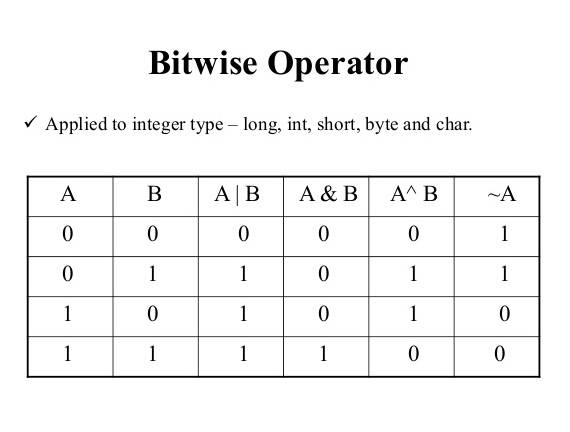
Solution: An optimized solution can be given using bitwise XOR operator. The bitwise XOR of two numbers is 0 only if each corresponding bit in the two numbers is same, i.e. the numbers are equal.
int isUnequal(int a, int b)
{
    return a ^ b;    // Returns zero if the numbers are equal, else a non-zero value
}

Since (a ^ b) might be any integer value, we can strictly restrict the return value to either 0 or 1 like this:
int isUnequal(int a, int b)
{
    return !!(a ^ b);    // Returns zero if the numbers are equal, else returns one
}

Another simple solution could be using the minus operator:
int isUnequal(int a, int b)
{
    return !!(a - b);    // Returns zero if the numbers are equal, else returns one
}
Read More
Anirudh

Find the number of bits to be flipped to convert number A to number B

Problem statement: You are given two numbers A and B. Write a program to count the number of bits needed to be flipped to convert A to B.

Example: Let A = 5 and B = 3, then they can be represented in binary as:
     A = 1 0 1
     B = 0 1 1
As can be seen, total 2 bits are needed to be flipped to convert A to B in this case.

Solution: This problem can be restated as to find the number of dissimilar corresponding bits in A and B. And the bitwise XOR operator (^) can help us in finding that. The XOR of two bits is 1 only when the bits are not same. So, our solution involves two simple steps:

1. Find the bitwise XOR of A and B.
2. Count the number of set bits in the result.

int countFlippedBits(int a, int b)
{
    unsigned int count = 0;

    /* Bitwise XOR of a and b */
    unsigned int x = a ^ b;

    /* Finding the no. of set bits in the XOR result */
    while (x)
    {
        count += (x & 1);
        x >>= 1;
    }

    return count;
}
Read More

Tuesday, 16 August 2016

Anirudh

Passing NULL to printf() in C

Consider the following code snippet:
char *p = NULL;
printf ("%s", p);
What should be the output of the above code?

The printf() function with "%s" format specifier expects a '\0'-terminated array of characters (or string literal) whereas it receives a null pointer. Passing NULL to printf() is undefined behavior in C.

According to Section 7.1.4 (of C99 or C11): Use of library functions,
"If an argument to a function has an invalid value (such as a value outside the domain of the function, or a pointer outside the address space of the program, or a null pointer, or a pointer to non-modifiable storage when the corresponding parameter is not const-qualified) or a type (after promotion) not expected by a function with variable number of arguments, the behavior is undefined."

Some compilers may produce "(null)" written on the screen while others may give segmentation fault. GCC prints (null).

What is NULL?
NULL is a macro defined by several headers (including stdio.h, stddef.h, stdlib.h, string.h, time.h etc.) as a null pointer constant, typically 0 or ((void *)0). It is a value which is "guaranteed to compare unequal to a pointer to any object or function", as per C standard. That is, a null pointer points definitively nowhere - it is never the address of any object or function. The address-of operator '&' will never yield a null pointer, nor will a successful call to malloc() (malloc does return a null pointer when it fails).

Here is a program to demonstrate the effect of passing null pointer to printf() with different format specifiers.
/* Effects of passing null pointer to printf() */

#include <stdio.h>
int main()
{
    printf ("%s \n", NULL);  // Undefined behavior, prints (null) in GCC
    printf ("%d \n", NULL);  // The value of NULL macro (typically 0)
    printf ("%c \n", NULL);  // The ASCII character corresponding to the value of NULL macro
                             // (generally value is 0, so null character '\0', i.e. blank result).
    return 0;
}

Output in GCC:
(null)
0

Read More

Monday, 15 August 2016

Anirudh

The many different ways of swapping two numbers

One of the most seen snippets of code is the one that swaps the values of two variables. This little job is crucial to many algorithms, and there are multiple ways of doing it. Generally, for swapping two variables we use a temporary third variable, but various other ways do not even require the help of any third variable.
I find it very interesting that there are so many ways of doing this seemingly simple job and so, I thought to share all the ways I know of swapping two numbers...

1. The simple method using a third variable
#include <stdio.h>
int main()
{
    int a = 10, b = 5, temp;

    // Code to swap a and b:
    temp = a;
    a = b;
    b = temp;

    printf("After swapping: a = %d, b = %d", a, b);
    return 0;
}

Now let's look at some methods which do not require any additional variables.

2. Using arithmetic operators + and -
a = a + b;
b = a - b;
a = a - b;
The above way works well, but it may cause arithmetic overflow when adding large numbers.

3. Using arithmetic operators * and /
a = a * b;
b = a / b;
a = a / b;
This way will not work if one of the numbers is zero, as the product becomes zero. It may also cause arithmetic overflow when multiplying large numbers.

4. Using bitwise XOR operator ^
a = a ^ b;
b = a ^ b;
a = a ^ b;
This method is perhaps a bit more efficient, because it uses bitwise operator only. It can also be written in a more compact manner like this:
a ^= b;
b ^= a;
a ^= b;

Note: When using pointers to the variables, the above methods 2, 3 and 4 will fail if both the pointers point to the same variable. Example: If a function to swap two variables is accepting the addresses of the two variables, then a call like swap(&a, &a); should make no effect on the value of variable a, but in the above methods (except method 1) the variable will store incorrect value. So, we need to firstly check if both the pointers are exactly the same. A good example of using the above swap methods with pointers can be like:
void swap(int *x, int *y)
{
    if(x != y)    // Checking that x and y are not pointing to the same location
    {
        *x ^= *y;
        *y ^= *x;
        *x ^= *y;
    }
}

5. Using bitwise XOR operator ^ in one line
a ^= b ^= a ^= b;
This is similar to method 4 but three statements have been compounded into one. Order of evaluation is from right to left.

6. Using arithmetic operators + and - in one line
a = (a + b) - (b = a);
The problem of arithmetic overflow can occur in this method.

7. Using arithmetic operators * and / in one line
a = (a * b) / (b = a);
The problem of arithmetic overflow can occur in this method. Also, it will show undefined behavior if the first number a = 0 (because that will lead to division by zero).

8. Using arithmetic operators + and - in a slightly different way
a = b - a;
b = b - a;
a = b + a;
Note that the corresponding method with * and / operators does not work.

Note: The methods 5, 6, 7 and 8 also work well when using pointers to the variables. But methods 5 and 8 will give wrong result if the pointers point to the same location.

9. Using a file as buffer
FILE *fp;

fprintf(fp = fopen("temp.txt", "w"), "%d", a);
fclose(fp);
a = b;
fscanf(fp = fopen("temp.txt", "r"), "%d", &b);
fclose(fp);
Of course, using such a method incurs a lot more overhead than the usual methods. Just included for theoretical purposes.

10. Using a command-line-related variable as buffer
int main(int argc, char **argv)
{
    int a = 10, b = 5;

    argc = a;
    a = b;
    b = argc;

    printf("After swapping: a = %d, b = %d", a, b);
    return 0;
}

11. Using a macro
#define SWAP(x, y, Type) Type temp = x; x = y; y = temp;

int main()
{
    int a = 10, b = 5;

    SWAP(a, b, int);

    printf("After swapping: a = %d, b = %d", a, b);
    return 0;
}
Its advantage is that it is generic up to some extent. The same SWAP macro will work for types like int, float and char. By using this GCC-specific extension, we can improve it further like:
#define SWAP(x, y) typeof(x) temp = x; x = y; y = temp;
The problem with method 11 will arise when there is already a variable named temp in the program!
Read More
Anirudh

Puzzle: 100 statements

There are 100 statements.
1st one says: At least one statement is wrong.
2nd one says: At least two statements are wrong.
3rd one says: At least three statements are wrong.
4th one says: At least four statements are wrong.
...and so on till
100th one says: At least hundred statements are wrong.

Determine how many statements are actually wrong and how many are actually right?

Answer: Show answer
Let's start looking at the statements one by one. The 100th statement is definitely wrong because it says at least all 100 are wrong. But if that was correct, then the 100th statement itself cannot be right!
=> 100th statement is wrong
=> 1st statement is correct
(so far 1 wrong and 1 correct)

Similarly, the 99th statement says that at least 99 statements are wrong, i.e. maximum 1 among 100 may be correct, which we have already concluded that the 1st one is correct. But in that case, the 99th statement itself cannot be correct, because if we say that 99th is correct then we will get total 2 correct statements (1st and 99th), which is conflicting with the 99th statement itself.
=> 99th statement is wrong
=> 2nd statement is correct
(so far 2 wrong and 2 correct)

Calculating in a similar fashion, we will finally get the last 50 statements to be wrong and the first 50 statements to be right.

Read More

Sunday, 14 August 2016

Anirudh

Puzzle: Heaven or hell

You are standing before two closed doors. One of the doors leads to heaven and the other one leads to hell. There are two guards, one by each door. You know that one of them always tells the truth and the other one always lies, but you don't know who is the honest one and who is the liar.

You can ask only one question to only one of them in order to find the way to heaven. What should be your question so that you can identify the door to heaven?

Answer: Show answer
This is one of the classic puzzles asked in interviews. The question you should ask is "If I ask the other guard about which side leads to heaven, what would he answer?". It should be fairly easy to see that irrespective of whom you ask this question, you will always get an answer which leads to hell. So you can chose the other path to continue your journey to heaven.

Here is the explanation: Let us assume that the left door leads to heaven. If you ask the guard who speaks truth about which path leads to heaven, he would say "left", as he always speaks the truth. So, if the liar is asked what "the other guard - the truth teller" would answer, he would lie and definitely say "right", which is the door to hell.

Similarly, if you ask the liar about which path leads to heaven, he would say "right". Now, when the truth teller is asked about what "the other guard - the liar one" would answer, he would fairly say "right", again the path to hell. So in any case, you would end up knowing the path to hell as an answer. So you can chose the other path as the way to heaven.

Read More
Anirudh

Implement a program that sorts given data according to the switch provided by the user

Command line arguments, as discussed here, can be used to make a program run differently on different executions. The user is able to pass additional parameters while running a program, so that it can behave in different ways based on the user's request. We are going to implement one such program here.

Problem statement: Implement a program which sorts the data given in command line arguments according to the switch provided by the user, as explained below:
No switch : Sort lexicographically
-i : Sort lexicographically ignoring the case
-n : Sort numerically
-r : Sort numerically in reverse

Sample execution 1:
./a.out geek factorial aaa BCD 202 21
Sample output 1:
No switch detected. Sorting lexicographically:
202
21
BCD
aaa
factorial
geek

Sample execution 2:
./a.out -i BCD aaa
Sample output 2:
Switch -i detected. Sorting lexicographically ignoring the case:
aaa
BCD

Sample execution 3:
./a.out -n 101 30 60
Sample output 3:
Switch -n detected. Sorting numerically:
30
60
101

Sample execution 4:
./a.out -r 101 30 60
Sample output 4:
Switch -r detected. Sorting numerically in reverse:
101
60
30

Solution (using command line arguments as switches and a single sort function): We can test if the first argument provided is recognized as a switch, and then we can do the operations accordingly. The following C program works on this concept. It uses one sort function to sort data in any manner based on different comparison functions (the appropriate comparison function is passed to it via function pointer, after recognizing the switch).

#include <stdio.h>
#include <string.h>
#include <ctype.h>


/* The central sorting function which can take different comparison functions as argument via function pointer */
void sort(int argc, char *argv[], int (*compare)(char*, char*))
{
    int i, j;
    char *temp;

    for(i = 1; i < argc - 1; i++)
        for(j = 1; j < argc - 1; j++)
            if((*compare)(argv[j], argv[j+1]) > 0)  // Make comparison according to the passed comparison function
            {
                temp = argv[j];        // Swapping of pointers to strings, argv[j] and argv[j+1]
                argv[j] = argv[j+1];
                argv[j+1] = temp;
            }
}


/* Function to compare 2 strings (having numbers) numerically */
int compNum(char *s1, char *s2)
{
    int n1, n2;
    sscanf(s1, "%d", &n1);
    sscanf(s2, "%d", &n2);

    if(n1 > n2)
        return 1;
    else
        return 0;
}


/* Function to compare 2 strings (having numbers) numerically (according to reverse/descending order) */
int compNumReverse(char *s1, char *s2)
{
    int n1, n2;
    sscanf(s1, "%d", &n1);
    sscanf(s2, "%d", &n2);

    if(n1 < n2)
        return 1;
    else
        return 0;
}


/* Function to compare 2 strings lexicographically */
int compStr(char *s1, char *s2)
{
    if(strcmp(s1, s2) > 0)
        return 1;
    else
        return 0;
}


/* Function to compare 2 strings lexicographically (ignoring the case) */
int compStrIgnoreCase(char *s1, char *s2)
{

    /*
       We can use strcmpi(s1, s2) function to compare 2 strings ignoring their case. But strcmpi() is not a standard C function and may not work on every platform.
       Similarly, strlwr() and strupr() functions that can convert a passed string to lower and upper case respectively can be used here, but they are also non-standard.
       So, we should prefer using tolower() (or toupper()) functions which are standard functions defined in the header file "ctype.h" to convert a passed character variable to lowercase (or uppercase).
       We can convert strings to lowercase (or uppercase) character-by-character, as done below, and then compare them using strcmp(s1, s2) function.
    */

    int i;
    char s11[strlen(s1)+1], s22[strlen(s2)+1];  // Make copy of strings and convert them to lowercase
    for(i = 0; s1[i]; i++)
        s11[i] = tolower(s1[i]);
    for(i = 0; s2[i]; i++)
        s22[i] = tolower(s2[i]);

    if(strcmp(s11, s22) > 0)  // Compare the duplicated and lowercased strings
        return 1;
    else
        return 0;
}


/* Function for left shifting the array of strings by one, to remove the first string having the switch, and reduce argc by 1 */
void leftShift(int *argcPtr, char *argv[])
{
    int i;
    for(i = 1; i < (*argcPtr) - 1; i++)
        argv[i] = argv[i+1];  // Just make each argv[i] poiner point to the next string

    (*argcPtr)--;  // Reduce (*argcPtr) by one
}


/* Main function */
int main(int argc, char *argv[])
{
    int i;

    /* Check if no arguments are provided, then return */
    if(argc == 1)
    {
        printf("\nNo input command line arguments provided.\n");
        return 0;
    }

    if(strcmp(argv[1], "-n") == 0)         // Switch "-n" was given
    {
        /* Left shift the array of strings by one to remove the string having the switch, and reduce argc by 1 */
        leftShift(&argc, argv);

        printf("\nSwitch -n detected. Sorting numerically:\n");
        /* Call sort() function with appropriate comparison function passed as argument */
        sort(argc, argv, compNum);
    }
    else if(strcmp(argv[1], "-r") == 0)    // Switch "-r" was given
    {
        leftShift(&argc, argv);

        printf("\nSwitch -r detected. Sorting numerically in reverse:\n");
        sort(argc, argv, compNumReverse);
    }
    else if(strcmp(argv[1], "-i") == 0)    // Switch "-i" was given
    {
        leftShift(&argc, argv);

        printf("\nSwitch -i detected. Sorting lexicographically ignoring the case:\n");
        sort(argc, argv, compStrIgnoreCase);
    }
    else                                   // No switch identified
    {
        /* No need to left shift the array of strings as there is no switch */

        printf("\nNo switch detected. Sorting lexicographically:\n");
        sort(argc, argv, compStr);
    }

    /* Print the result */
    for(i = 1; i < argc; i++)
            printf("%s\n", argv[i]);

    return 0;
}

The above program runs like this:
./a.out geek factorial
No switch detected. Sorting lexicographically:
factorial
geek

./a.out -n 67 45 23 32
Switch -n detected. Sorting numerically:
23
32
45
67

./a.out -r 67 45 23 32
Switch -r detected. Sorting numerically in reverse:
67
45
32
23
 
./a.out
No input command line arguments provided.
Read More
Anirudh

Command line arguments in Java

Command line arguments constitute the additional information that can be passed to a program at the time of its execution via command line. They are given just after the program's name on the command line interface of the operating system.

You can read more about the use of command line arguments here.

Command line arguments in Java:
The arguments passed from the console can be received in a Java program via the argument variable in its main function. To use command line arguments in your Java program, you must first understand the declaration of the main function. There is an array of Strings present within the declaration of the main method, generally named as String[] args (since args is nothing more than an identifier, we can replace it with any other name). Now what we need to know is how a String array can be passed as an argument when we execute the program. We pass it through the command line itself.

Consider that we have a class named Add. The following statement is normally used to execute the program: java Add
If we wish to pass the String array, we simply write the elements of the array after the class name. Enclosing the Strings in quotes is optional. Consecutive Strings are separated with a space. For example, if we wish to pass two Strings as arguments, containing the values "15" and "3", then any of the following lines can be entered on the command prompt: java Add 15 3 or java Add "15" "3"

Since these arguments are passed through the command line, they are known as command line arguments. The String arguments passed are stored in the array of Strings specified in the main function's header. In the above example, args[] will contain two Strings, "15" and "3". These elements are accessed in the same way as the elements of a normal array. Note that unlike C, Java does not store the program file's name as a command line argument. The following is a complete program which displays the sum of numbers passed as command line arguments.

/* Java program to display sum of all given numbers via command line arguments: */

public class Add {

    public static void main (String[] args) {
        int sum = 0;

        if (args.length == 0)
            System.out.println ("No arguments provided.");
        else {
            for (int i = 0; i < args.length; i++)
                sum += Integer.parseInt (args[i]);    // Convert string args[i] to integer

            System.out.println ("Sum of provided numbers: " + sum);
        }
    }
}
The above program works like this:
java Add
No arguments provided.

java Add 15 3
Sum of provided numbers: 18

java Add "15" "3"
Sum of provided numbers: 18
Read More
Anirudh

Command line arguments and their implementation in C

Many programs allow command-line arguments to be specified when they are run. Command line arguments are used to pass any additional information to a program when it is executed via command line interface. It is the information that follows the program's name on the command line of the operating system.

Why are command line arguments useful?
Command line arguments allow the user to pass additional parameters while running a program, so that it can behave in many different ways based on the user's request.

For example, if we use the ls command on Unix/Linux to list the files in a directory, we get the list of files in some default format. Now if we give the command ls -l, we get the contents in a long listing format with details like owner, permissions etc. The -l part can be considered as a command line argument (or "switch" in Linux).

Similarly, when you use a text editor, you may specify the name of the file you want to edit after the name of the editor program. For example, a command like emacs myfile will open the file named "myfile" in the editor "Emacs".

Command line arguments in C:
To use command line arguments in a C program, you must first understand the full declaration of the main function. Main can generally accept two arguments - one is the number of command line arguments passed to it, and the other is the actual list of all of the command line arguments. The full declaration of main looks like this:

int main (int argc, char *argv[])
Or this:
int main (int argc, char** argv) 

The integer argc is the argument count (i.e. the number of arguments passed into the program from command line, including the name of the program). The array of character pointers argv is the listing of all the argument variables (i.e. pointers to strings containing the command line arguments). Some interesting things are to be noted here:
  • The first argument, argv[0], is the name of the program, or an empty string if the name is not available. Hence, if no arguments are supplied, argument count (argc) will be one and the only command line argument available will be the program file name.
  • After that, every element number less than argc is a command line argument. You can use each argv element just like a string (or use argv as a two dimensional array).
  • At last, the pointer argv[argc] is a null pointer.
For example, if a C program is run via a command such as ./a.out apple ball cat, then the command-line variables will hold the following values:

     argc = 4
     argv[0] = "./a.out" (the file name)
     argv[1] = "apple"
     argv[2] = "ball"
     argv[3] = "cat"
     argv[4] = (null)

How can this concept be implemented?
Almost any program that wants its parameters to be set when it is executed would use this concept. Let us make a C program that takes numbers as command line arguments and displays their sum.

/* C program to display the sum of all given numbers via command line arguments: */

#include <stdio.h>

int main (int argc, char *argv[]) {

    int sum = 0, i, num;

    if (argc < 2) {
        printf ("No arguments provided.\n");
        return 0;
    }

    for (i = 1; i < argc; i++) {
        sscanf (argv[i], "%d", &num);    // Convert string argv[i] to number num
        sum += num;
    }

    printf ("Sum of provided numbers: %d\n", sum);
    return 0;
}
The above program works like this:
./a.out
No arguments provided.

./a.out 10 2 3
Sum of provided numbers: 15 

Also see: Command line arguments in Java
Read More

Friday, 12 August 2016

Anirudh

Puzzle: Man in the bar

A man walks into a bar and asks the barman for a glass of water. The barman pulls out a gun and points it at the man. The man says, "Thank you!" and walks out. Explain what would have happened.

Answer: Show answer
The man had hiccups. The barman recognized this from his speech and drew the gun in order to give him a shock. It worked and cured the hiccups – so the man no longer needed water.

Read More

Thursday, 11 August 2016

Anirudh

Puzzle: Trouble of not twins

A woman had two sons who were born on the same hour of the same day of the same year. But they were not twins. How could this be so?

Answer: Show answer
They were two from a set of triplets (or quadruplets etc.)! This simple little puzzle stumps many people. They try outlandish solutions involving test-tube babies or surrogate mothers. Why does the brain search for complex solutions when there is a much simpler one available?

Read More
Anirudh

Puzzle: Deadly party

A man went to a party and drank some of the punch. He then left early. Everyone else at the party who drank the punch subsequently died of poisoning. Why did the man not die?

Answer: Show answer
The poison in the punch came from the ice cubes. When the man drank the punch, the ice was fully frozen. Gradually it melted, poisoning the punch, so the people who drank it with the melted ice died of poisoning.

Read More

Wednesday, 10 August 2016

Anirudh

Binary Search in sorted and shifted (rotated) array

We know that Binary Search can be used to find an element in a sorted array of elements in O(log n) time. The algorithm is very versatile and with little modifications, it can be utilized in many more places for efficiency. Let us see one such problem.

Problem statement: You've been given an array that is sorted and then rotated by some unknown offset. For example, consider a sorted array arr[] = {1, 2, 3, 4, 5}. This array is now rotated, say twice, to the right such that arr[] = {4, 5, 1, 2, 3}. The offset of rotation is not known to you for a given array. Devise a way to find an element in the rotated array in O(log n) time.

Modified Binary Search approach: Now how efficiently can one search in this sorted + rotated array? The key is to find the offset position, i.e. the position at which array order is changed. For example, in the above array arr[], the offset position can be taken as index 1 (where element 5 is stored) because the very next element is the actual starting element of the sorted array, which is the smallest element. It can be seen that the array is divided into two sorted sub-arrays at the offset position.

So, if the offset is known to us, we can apply Binary Search in the two sorted sub-arrays one by one to find out the element in O(log n) time. Now all we have to worry about is finding the offset, and that too in O(log n) running time. This can be accomplished via a modified Binary Search, which considers the fact that the offset element is the only element in the array for which the very next element to it is smaller. By using this as a condition, we can find the offset.

Solution: Here is a C program which implements the above approach.

#include <stdio.h>

/* Function to find the offset position in O(log n) via modified Binary Search */
int findOffset(int *arr, int low, int high, int size)
{
    int mid;
    if (low <= high)
    {
        mid = low + ((high - low) / 2);

        if (arr[mid] > arr[mid+1])
            /* Offset position found at mid */
            return mid;
        else
        if (arr[mid] > arr[size-1])
            /* Offset may be on the right hand side, as arr[mid] is greater than the very last element in arr[] */
            return findOffset(arr, mid+1, high, size);
        else
            /* Offset may be on the left hand side */
            return findOffset(arr, low, mid-1, size);
    }

    return -1;    // No offset found in arr[]
}

/* Function for performing Binary Search to find item in the array */
int binarySearch(int *arr, int low, int high, int item)
{
    int mid;
    if (low <= high)
    {
        mid = low + ((high - low) / 2);

        if (arr[mid] == item)
            return mid;
        else
        if (arr[mid] > item)
            return binarySearch(arr, low, mid-1, item);
        else
            return binarySearch(arr, mid+1, high, item);
    }

    return -1;
}

/* Main function */
int main()
{
    int i, size, offset, item, index, *arr;
    printf("\nEnter size of array: \n");
    scanf("%d", &size);
    arr = (int*)malloc(size * sizeof(int));

    printf("\nEnter elements in array: \n");
    for (i = 0; i < size; i++)
        scanf("%d", &arr[i]);

    printf("\nEnter search item: \n");
    scanf("%d", &item);

    /* Get the position of offset (rotation) */
    offset = findOffset(arr, 0, size-1, size);

    /* If the array was not rotated, use normal Binary Search */
    if (offset == -1)
    {
        index = binarySearch(arr, 0, size-1, item);
        (index != -1) ? printf("Item found at index  %d.\n", index) : printf("Item not found.\n");
    }
    /* Otherwise the array was rotated, use Binary Search in left and right sub-arrays separately */
    else
    {
        /* Search in the sub-array till the offset position */
        index = binarySearch(arr, 0, offset, item);
        if (index != -1)
            printf("Item found at index  %d.\n", index);
        else
        {
            /* Search in the sub-array right of the offset position */
            index = binarySearch(arr, offset+1, size-1, item);
            (index != -1) ? printf("Item found at index  %d.\n", index) : printf("Item not found.\n");
        }
    }

    return 0;
}
Read More
Anirudh

There may be a bug hidden in your Binary Searches and Merge Sorts!

Your implementation of the Binary Search algorithm might be having a concealed bug in it! This Binary Search bug applies equally to Merge Sort and many other Divide and Conquer algorithms. If you have any code that implements one of these algorithms, better fix it now before it messes something up.

Here is a generally seen Binary Search code (in Java):
public static int binarySearch(int[] a, int item) {
    int low = 0;
    int high = a.length - 1;

    while(low <= high) {
        int mid = (low + high) / 2;

        if(a[mid] == item)
            return mid;        // Key found
        else if (a[mid] < key)
            low = mid + 1
        else
            high = mid - 1;
    }

    return -(low + 1);         // Key not found
}

The bug is in this line:
int mid = (low + high) / 2;    // Problem!
What the above line does is that it sets mid to the average of low and high, truncated down to the nearest integer. At a glance, nothing seems to be wrong in that, but it fails for large values of the int variables low and high. Specifically, it fails if the sum of low and high is greater than the maximum positive int value (231 - 1). The sum overflows to a negative value and the value stays negative when divided by two, causing the array to go out of bounds. In Java, it throws ArrayIndexOutOfBoundsException while in C it causes unpredictable results. This bug can manifest itself for arrays whose length (in elements) is 230 or greater (roughly a billion elements).


So now we want to fix it, right? Here are some ideas to correct the line:
int mid = low + ((high - low) / 2);

Also note that right shifting a number by one bit is equivalent to dividing it by 2. We can utilize the unsigned right shift operator (>>>) available in Java. The >>> operator lets you treat int and long as 32-bit and 64-bit unsigned integral types (Java does not provide unsigned int and unsigned long data types).
int mid = (low + high) >>> 1;

In C and C++, where you don't have the >>> operator, you can do this:
int mid = ((unsigned int)low + (unsigned int)high)) >> 1;

Note:
  • You should always check array algorithms for possible overflow.
  • Elements that are meant to store array indexes should be taken as unsigned int.
(Credit to this article on Google Research Blog for the above concepts.)
Read More

Tuesday, 9 August 2016

Anirudh

Binary Search

Binary search, also known logarithmic search or half-interval search, is a "Divide and Conquer" search algorithm that finds the position of a target value within a sorted array in run-time complexity of Ο(log n). It is one of the fundamental algorithms in Computer Science. For this algorithm to work properly the data collection should be in sorted form.

Binary search searches for a particular item by comparing it with the middle element of the array. If match occurs, then index of the middle element is returned. If the item is smaller than the middle element, then it is searched in the left sub-array of the middle element, otherwise the item is searched in the right sub-array of the middle element. This process continues on the sub-arrays as well, till the item is found or the size of sub-array reduces to zero.

(Image from Wikipedia)

Time Complexity: O(log n)
Space Complexity: O(1) in iterative implementation and O(log n) in recursive implementation (considering the recursion call stack space).

Both iterative and recursive implementations of Binary Search are shown here:

1. Iterative Binary Search:
int binarySearch(int *A, int size, int item)
{
    int start = 0, end = (size - 1), mid;

    while(start <= end)
    {
        mid = (start + end) / 2;

        if(A[mid] == item)
            return mid;            // Item found at index mid

        else if(A[mid] > item)
            end = mid - 1;         // Item may be on the left sub-array

        else
            start = mid + 1;       // Item may be on the right sub-array
    }

    return -1;    // Not found
}

2. Recursive Binary Search:
int binarySearch(int *A, int start, int end, int item)
{
    int mid;

    if(start <= end)
    {
        mid = (start + end) / 2;

        if(A[mid] == item)
            return mid;

        else if(A[mid] > item)
            return binarySearch(A, start, mid-1, item);

        else
            return binarySearch(A, mid+1, end, item);
    }

    return -1;
}

Note: The above Binary Search algorithms may fail in some cases. See this post for detail: There may be a bug hidden in your Binary Searches and Merge Sorts!
Read More
Anirudh

Some bit manipulation puzzles in C

Most programming languages like C, C++, Java, Python offer various bit level manipulation operators (bitwise operators) and many puzzling questions can be formed based upon these operators. I am sharing some of such bit manipulation questions here. Attempting challenging programs like these is a great way to learn about the bit level representation of numbers and the various bitwise operators (&, |, ^, ~, >>, <<).

These questions require you to implement a piece of code with only a limited set of operators.

Write a function to perform bitwise AND using ~ and | operators only.
int bitAnd(int a, int b)
{
    return ~(~a | ~b);
}

Write a function to perform bitwise XOR using ~ and & operators only.
int bitXor(int a, int b)
{
    return ~(~(~a & b) & ~(a & ~b));
}

Write a function to give sign info about a number x without using conditional statements, >, <, == and - operators. Return 1 if x > 0, -1 if x < 0 and 0 if x = 0.
int sign(int x)
{
    return (x>>31) | (!!x);
}

Write a function to compare 2 numbers without using conditional statements, >, <, == and - operators. Return 1 if a > b, -1 if a < b and 0 if a = b.
Here, negative of b is obtained by taking its 2's complement using biwsise operators. This is then added to a and the sign of the result is determined. See above question for sign() function.
int compare(int a, int b)
{
    return sign(a + (~b + 1));
}

Write a function to return logical not of a given number x (i.e. !x), without using ! operator and conditional statements.
int not(int x)
{
    int neg_x = ~x + 1;
    return 1 ^ ((x>>31 & 1) | (neg_x>>31 & 1));
}
Another way: The second way exploits the fact that the right hand side of a logical AND (&&) is never evaluated if the left hand side is false (0) and similarly, the right hand side of a logical OR (||) is never evaluated if the left hand side is true (non-zero).
int not(int x)
{
    int res;
    (x && ~(res=0)) || (res=1);
    return res;
}

Write a function to implement conditional operator ?: using bitwise operators only.
int conditional(int a, int b, int c)
{
    return ((~(!a<<31) >> 31) & b) | (((!a<<31) >> 31) & c);
}

/*
    Another approach could have been like this:
    int res;
    (a && (res=b)) || (res=c);  // But this WILL NOT WORK in case a=1 and b=0 
                                // (as "res = b" returns b, so it will return 0 on the LHS of ||
                                // and then res will then be set to c).
    return res;
*/


Write a function to print binary representation of a given number.
void printBinary(int x)
{            
    int i;
    int msb = (sizeof(int) * 8) - 1;  // 31 for a 4 byte int

    for(i = msb; i >= 0; i--)
        printf("%d", (x>>i) & 1);
}
Read More
Anirudh

Randomized Quick Sort algorithm - O(n log n) worst case complexity

The worst case time complexity of a typical implementation of Quick Sort is O(n2). The worst case occurs when the picked pivot is always an extreme (smallest or largest) element, which happens when the input array is either sorted or reversely sorted and either first or last element is picked as pivot.

Randomized Quick Sort algorithm (with random pivot):


In the randomized version of Quick sort we impose a distribution on input by picking the pivot element randomly. Randomized Quick Sort works well even when the array is sorted/reversely sorted and the complexity is more towards O(n log n). (Yet, there is still a possibility that the randomly picked element is always an extreme.)

Here, we will pick a random pivot position with the help of rand() function (defined in stdlib.h header file). Then we can swap pivot element with the element at the Left position (or the Right position in some implementations) and Quick Sort the array.

void swap(int *A, int x, int y) {
    int temp;
    temp = A[x];
    A[x] = A[y];
    A[y] = temp;
}

int getPivot(int Left, int Right) {
    return ( rand() % (Right - Left + 1) ) + Left;
}

void quickSort(int *A, int Left, int Right) {
    if(Left > Right)
        return;
    
    int i, pos, pivot;

    // Choosing pivot element randomly:

    pivot = getPivot(Left, Right);  // Get a random pivot
    swap(A, Left, pivot);           // Take A[pivot] to Left index and then do Quick Sort

    // Quick Sort the array:

    pos = Left;
        
    for(i = Left+1; i <= Right; i++)
        if(A[i] < A[Left])
            swap(A, ++pos, i);

    swap(A, Left, pos);  // By now, pos must be at proper position for A[Left].
                         // So we swap A[Left] with A[pos]

    quickSort(A, Left, pos-1);     // Sort left sub-list
    quickSort(A, pos+1, Right);    // Sort right sub-list
}
Read More
Anirudh

C program to show the range of various data types

We can determine the minimum and maximum possible of values of data types in C by using predefined constants in a program. Here is the code for displaying the ranges of various data types in C:

#include <stdio.h>
#include <limits.h>
#include <float.h>

int main() {

    printf("CHAR_BIT      :   %d\n", CHAR_BIT);
    printf("CHAR_MAX      :   %d\n", CHAR_MAX);
    printf("CHAR_MIN      :   %d\n", CHAR_MIN);
    printf("\n");
    printf("INT_MAX       :   %d\n", INT_MAX);
    printf("INT_MIN       :   %d\n", INT_MIN);
    printf("\n");
    printf("SHRT_MAX      :   %d\n", SHRT_MAX);
    printf("SHRT_MIN      :   %d\n", SHRT_MIN);
    printf("\n");
    printf("LONG_MAX      :   %ld\n", (long) LONG_MAX);
    printf("LONG_MIN      :   %ld\n", (long) LONG_MIN);
    printf("\n");
    printf("LLONG_MAX     :   %lld\n", (long long) LLONG_MAX);
    printf("LLONG_MIN     :   %lld\n", (long long) LLONG_MIN);
    printf("\n");
    printf("SCHAR_MAX     :   %d\n", SCHAR_MAX);
    printf("SCHAR_MIN     :   %d\n", SCHAR_MIN);
    printf("\n");
    printf("UCHAR_MAX     :   %d\n", UCHAR_MAX);
    printf("UINT_MAX      :   %u\n", (unsigned int) UINT_MAX);
    printf("ULONG_MAX     :   %lu\n", (unsigned long) ULONG_MAX);
    printf("USHRT_MAX     :   %d\n", (unsigned short) USHRT_MAX);
    printf("\n");
    printf("FLT_MAX       :   %g\n", (float) FLT_MAX);
    printf("FLT_MIN       :   %g\n", (float) FLT_MIN);
    printf("-FLT_MAX      :   %g\n", (float) -FLT_MAX);
    printf("-FLT_MIN      :   %g\n", (float) -FLT_MIN);
    printf("\n");
    printf("DBL_MAX       :   %g\n", (double) DBL_MAX);
    printf("DBL_MIN       :   %g\n", (double) DBL_MIN);
    printf("-DBL_MAX      :   %g\n", (double) -DBL_MAX);
    printf("-DBL_MIN      :   %g\n", (double) -DBL_MIN);

    return 0;
}

Output of above program on Ideone compiler is:
CHAR_BIT      :   8
CHAR_MAX      :   127
CHAR_MIN      :   -128

INT_MAX       :   2147483647
INT_MIN       :   -2147483648

SHRT_MAX      :   32767
SHRT_MIN      :   -32768

LONG_MAX      :   2147483647
LONG_MIN      :   -2147483648

LLONG_MAX     :   9223372036854775807
LLONG_MIN     :   -9223372036854775808

SCHAR_MAX     :   127
SCHAR_MIN     :   -128

UCHAR_MAX     :   255
UINT_MAX      :   4294967295
ULONG_MAX     :   4294967295
USHRT_MAX     :   65535

FLT_MAX       :   3.40282e+38
FLT_MIN       :   1.17549e-38
-FLT_MAX      :   -3.40282e+38
-FLT_MIN      :   -1.17549e-38

DBL_MAX       :   1.79769e+308
DBL_MIN       :   2.22507e-308
-DBL_MAX      :   -1.79769e+308
-DBL_MIN      :   -2.22507e-308

Explanation:
The header file limits.h defines the following constants:
  • CHAR_BIT = number of bits in a char
  • SCHAR_MIN = minimum value for a signed char
  • SCHAR_MAX = maximum value for a signed char
  • UCHAR_MAX = maximum value for an unsigned char
  • CHAR_MIN = minimum value for a char
  • CHAR_MAX = maximum value for a char
  • MB_LEN_MAX = maximum multibyte length of a character accross locales
  • SHRT_MIN = minimum value for a short
  • SHRT_MAX = maximum value for a short
  • USHRT_MAX = maximum value for an unsigned short
  • INT_MIN = minimum value for an int
  • INT_MAX = maximum value for an int
  • UINT_MAX = maximum value for an unsigned int
  • LONG_MIN = minimum value for a long
  • LONG_MAX = maximum value for a long
  • ULONG_MAX = maximum value for an unsigned long
  • LLONG_MIN = minimum value for a long long
  • LLONG_MAX = maximum value for a long long
  • ULLONG_MAX = maximum value for an unsigned long long

    (Here U*_MIN constants are omitted as any unsigned type has a minimum value of 0.)
Similarly float.h provides limits for float and double types:
  • FLT_MIN = min value of a float
  • FLT_MAX = max value of a float
  • DBL_MIN = min value of a double
  • DBL_MAX = max value of a double
  • LDBL_MIN = min value of a long double
  • LDBL_MAX = max value of a long double
Read More

Monday, 8 August 2016

Anirudh

Quick Sort

Quick Sort is a Divide and Conquer sorting algorithm. It picks an element as pivot element and partitions the given array around the picked pivot such that pivot element comes at its proper sorted position and the elements smaller than pivot element are on its left hand side and the elements larger than pivot element are on its right hand side. Now it recursively sorts the left sub-array and right sub-array of pivot element in the same manner till no further partitioning can be done.

There are many different versions of Quick Sort that pick pivot in different ways, like:
  1. Always pick first element as pivot. (implemented below)
  2. Always pick last element as pivot.
  3. Pick a random element as pivot.
  4. Pick median as pivot.
The key process in Quick Sort is partitioning. The target of partitions is that given an array and an element x of array as pivot, put x at its correct position (as that in sorted array) and put all elements smaller than x before x and all elements greater than x after x in the array. All this should be done in linear time.


Time complexity: O(n log n) in average case, O(n2) in worst case (Here worst case is when array is sorted or reversely sorted.)
Space complexity: O(log n) in average case, up to O(n) in worst case (This extra space may come from the call stack.)

Although the worst case time complexity of Quick Sort is O(n2) which is more than many other sorting algorithms like Merge Sort and Heap Sort, Quick Sort is faster in practice because its inner loop can be efficiently implemented on most architectures, and in most real-world data. The algorithm can be modified to make it much more efficient. For example, Randomized Quick Sort shows O(n log n) complexity even for worst case, as it picks pivot randomly.

Quick Sort can be implemented in different ways by changing the choice of pivot, so that the worst case rarely occurs for a given type of data. However, Merge Sort is generally considered better when data is huge and stored in external storage.

Below is one of the many ways to implement Quick Sort:

#include <stdio.h>

void swap(int *x, int *y)
{
    int temp = *x;
    *x       = *y;
    *y       = temp;
}

void quickSort(int *A, int Left, int Right)
{
    int i, pos;
    if(Left < Right)
    {
        pos = Left;
        for(i = Left+1; i <= Right; i++)
            if(A[i] < A[Left])
                swap(&A[++pos], &A[i]);   // When order is mismatched, increment pos and swap A[pos] with A[i]

        swap(&A[Left], &A[pos]);   // By now, pos is at proper position for A[Left]. Actually Left acts as pivot element here! Now swap A[Left] with A[pos]

        quickSort(A, Left, pos-1);     // Sort left sub-list
        quickSort(A, pos+1, Right);    // Sort right sub-list
    }
}

int main()
{
    int i, size;
    printf("\n\nEnter size of array: ");
    scanf("%d", &size);
    int A[size];

    printf("\n\nEnter %d elements: \n", size);
    for(i = 0; i < size; i++)
        scanf("%d", &A[i]);
 
    quickSort(A, 0, size-1);

    printf("\n\nQuick sorted: ");
    for(i = 0; i < size; i++)
        printf("%d ", A[i]);
 
    return 0;
}
Read More
Anirudh

Merge Sort

Merge sort is a "Divide and Conquer" algorithm which divides input array into two halves, calls itself for the two halves and then merges the two sorted halves. Basically, merge sort merges two sorted sub-arrays into one sorted array. For example: Let array A[] = {4, 5, 8, 9} and array B[] = {1, 2, 6, 10}, then the resulting array C[] = {1, 2, 4, 5, 6, 8, 9, 10}.

Merge sort is shown below for merging two separate sorted arrays into one sorted array, and then for merge-sorting a given unsorted array with help of recursion.

1. Merging two sorted arrays into one sorted array:
The idea is to place index variables i and j at start of the two arrays A[] and B[] respectively. Now compare the corresponding elements of the two arrays, copy the smaller element into the result array C[] and increment that index. Also, when one of the arrays is completely exhausted, just copy the remaining elements from the other array into the result.

void mergeSort(int *A, int *B, int *C, int sizeA, int sizeB, int sizeC)
{
    int a = 0, b = 0, c = 0;
    
    while(c < sizeC)
    {   
        if(a >= sizeA)          C[c++] = B[b++];    // Array A[] was exhausted
        else if(b >= sizeB)     C[c++] = A[a++];    // Array B[] was exhausted
        else if(A[a] < B[b])    C[c++] = A[a++];
        else                    C[c++] = B[b++];
    }
}

2. Merge sort a given array with help of recursion:
Now we know that we need two sorted arrays and we can merge sort them. Given an unsorted array, we can keep on splitting the array into two halved (sub-arrays) until size of sub-arrays reaches one. Now we can merge sort the sub arrays back to the actual array of given size, but in sorted order. The function mergeSortRecursive() is used to part the array into sub-arrays recursively until single elements are reached. The merge() function is used for merging two halves. This function merge(A, left, mid, right) assumes that sub-arrays A[left..mid] and A[mid+1..right] are sorted and merges the two sorted sub-arrays into one.

Time complexity: O(n log n)
Space complexity: O(n) (For taking an auxiliary array.)

#include <stdio.h>

void merge(int *A, int left, int mid, int right)    // For merge-sorting the array partitions A[left to mid] and A[mid+1 to right]
{
    int B[right];
    int i = left, j = mid+1, k;

    for(k = left; k <= right; k++)
    {
        if(i > mid)               B[k] = A[j++];    // Left array was exhausted. Copy right sub-array directly
        else if(j > right)        B[k] = A[i++];    // Right array was exhausted. Copy left sub-array directly
        else if(A[i] < A[j])      B[k] = A[i++];
        else                      B[k] = A[j++];
    }

    for(k = left; k <= right; k++)
        A[k] = B[k];
}

void mergeSortRecursive(int *A, int left, int right)    // For partitioning array recursively [in O(log n)] and then merge-sorting the 2 parts [in O(n)] via merge() function
{
    int mid;

    if(left < right)
    {
        mid = (left + right) / 2;
        mergeSortRecursive(A, left, mid);       // Partition
        mergeSortRecursive(A, mid+1, right);    // Partition

        merge(A, left, mid, right);             // Merge sort
    }
}

int main()
{
    int i, size;
    printf("\n\nEnter size of array: ");
    scanf("%d", &size);
    int A[size];

    printf("\n\nEnter %d elements: \n", size);
    for(i = 0; i < size; i++)
        scanf("%d", &A[i]);

    mergeSortRecursive(A, 0, size-1);

    printf("\n\nMerge sorted: ");
    for(i = 0; i < size; i++)
        printf(" %d ", A[i]);

    return 0;
}

Here is a diagram that tries to explain what is happening in recursive merge sort (taken from Wikipedia):

Read More

Saturday, 6 August 2016

Anirudh

How to calculate factorial of very large numbers in C/C++

In languages like C or C++, how can we find the factorial of large numbers like 100 or 1000? It seems difficult with limited range of data types at hand. Even with types like long long, the factorial of numbers only up to 20 can can be accurately stored (20! = 2432902008176640000).


So, here is an approach to calculate factorials of larger numbers in C, using array and the idea of old school mathematics: multiplying a number with another, one digit at a time, and taking the carry.

The idea:
1) Create an array res[] of some maximum size where the size is the number of maximum digits in output.
2) This array will have our resulting number (factorial) of given number N, digit by digit. Note that the number will be stored in the array in reverse order (for easier calculation and storage of digits).
2) Initialize value stored in res[] as 1 and also initialize the variable size (for holding the current size of res[]) as 1.
3) Now as we do while finding factorial, for every number n from 2 to N, keep on multiplying n with number stored in res[] digit by digit and update res[] and size to store the multiplication result.

How to multiply a number n with the number stored in res[]?
The idea is to use simple school maths - multiply n with every digit of res[] one by one. The important point to note here is that digits are multiplied from the rightmost digit to the leftmost digit. If we store digits of a number in their actual order in res[], then it becomes difficult to update the array without extra space. That is why res[] is maintained in reverse way, i.e. digits are stored from right to left.

Steps to multiply res[] and n:
1) Initialize carry as 0.
2) Do the following for i = 0 to size – 1
    a) Find value of (res[i] * n + carry). Let this value be stored in variable mul.
    b) Update res[i] by storing last digit of mul in it.
    c) Update carry by storing the remaining digits in carry.
3) At last, just put all digits of carry in res[] one by one and increase size by number of digits in carry.

Here is the program in C:

#include <stdio.h>
int main()
{
    int N, n, i, carry, size, mul;
    int res[3000];  // Let the array have capacity to store up to 3000 digits
                    // Numbers will be stored in reverse order in the array

    printf("\nEnter number to calculate factorial: ");
    scanf("%d", &N);

    res[0] = 1;     // Initialize the array with only 1 digit, i.e. 1
    carry = 0;      // Carry is initially 0
    size = 1;       // Initializes digit counter as 1 (no of digits in the array)

    for(n = 2; n <= N; n++)
    {
        for(i = 0; i < size; i++)      // Loop for multiplying numbers n and res[]
        {
            mul = (res[i] * n) + carry;  // Product of n with each digit + carry from previous operation
            res[i] = mul % 10;           // Put first digit of product with ith digit at position i itself
            carry = mul / 10;            // Remaining carry value that will be stored in later indexes
        }

        while(carry > 0)               // Loop for storing the remaining carry value to the array
        {
            res[size++] = carry % 10;
            carry /= 10;
        }
    }

    printf("\nFactorial = ");       // Printing the result
    for(i = size-1; i >= 0; i--)    // Array is stored in reverse so printing in reverse
        printf("%d", res[i]);

    return 0;
}
Read More

Friday, 5 August 2016

Anirudh

Hello, World!

Hello everyone! This is Anirudh Khanna typing. I am a BE Computer Science student currently studying in 3rd year and I am a hardcore CS geek at heart. Geek Factorial (or Geek!) is a place where I will write about programming, technology, CS concepts and my views on Computer Science in general.

As we know, the factorial of anything is either equal to or (in most cases) larger than itself. So Geek! is started with the philosophy that whenever a geek comes here looking for knowledge, then he shall leave geekier than he was. And don't worry if your geekiness is currently just zero, because even 0! = 1, which is a good start! Cheers ;)
Read More